

 Platform
 W&B Models
 W&B Weave
 W&B Inference
 W&B Training
 Release Notes
tmux.
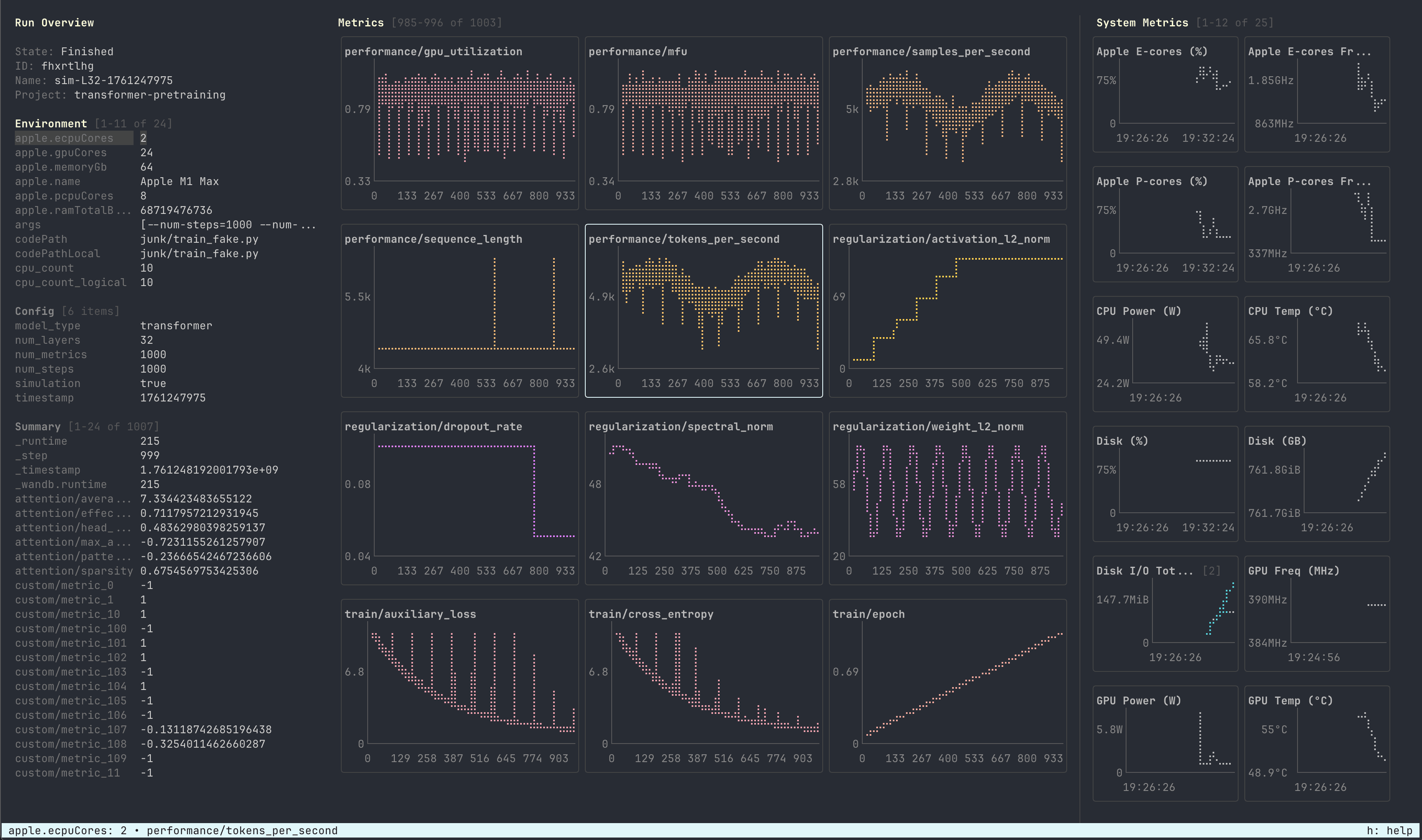
- Keyboard-first navigation: All features accessible via keyboard shortcuts
- Live updates: Monitors the
.wandbfile in real-time as your run progresses - Metric filtering: Filter metrics using glob patterns or substring matching
- Smart zooming: Mouse wheel zoom keeps the latest data points in view
- Customizable grids: Configure the number of rows and columns for metric and system displays
- Human-readable formatting: System metrics show friendly units (e.g., “GPU Utilization (%)”, “RAM Used (GB)”)
- Left sidebar: Run Overview showing environment variables, configuration, and summary statistics
- Center panel: Metrics grid with Braille-style line charts for logged metrics
- Right sidebar: System Metrics displaying GPU utilization, RAM, CPU, and other system health indicators
Keyboard Shortcuts
General
Panels
Navigation
Charts
Run Overview
Configuration
Run Overview Navigation (when sidebar open)
Mouse
Launch W&B LEET: the Lightweight Experiment Exploration Tool.
LEET is a terminal UI for viewing a W&B run specified by an optional PATH.
PATH can include a .wandb file or a run directory containing a .wandb file. If PATH is not provided, the command will look for the latest run.